Features

One call-off, from both sides of the shift.

Syntrah is a console for your office and one mobile app for your caregivers and staff. Follow a single call-off through both, then see what each side does the rest of the week.

Call-off coverage

When someone calls off, the search starts by itself.

One call-off, followed from the caregiver’s phone to the scheduler’s console and back. Nobody rings around, and nothing is left to expire.

In the mobile appIn the console

  1. 4:57 AM

    In the app · Angie, CNA

    Angie calls off from her phone.

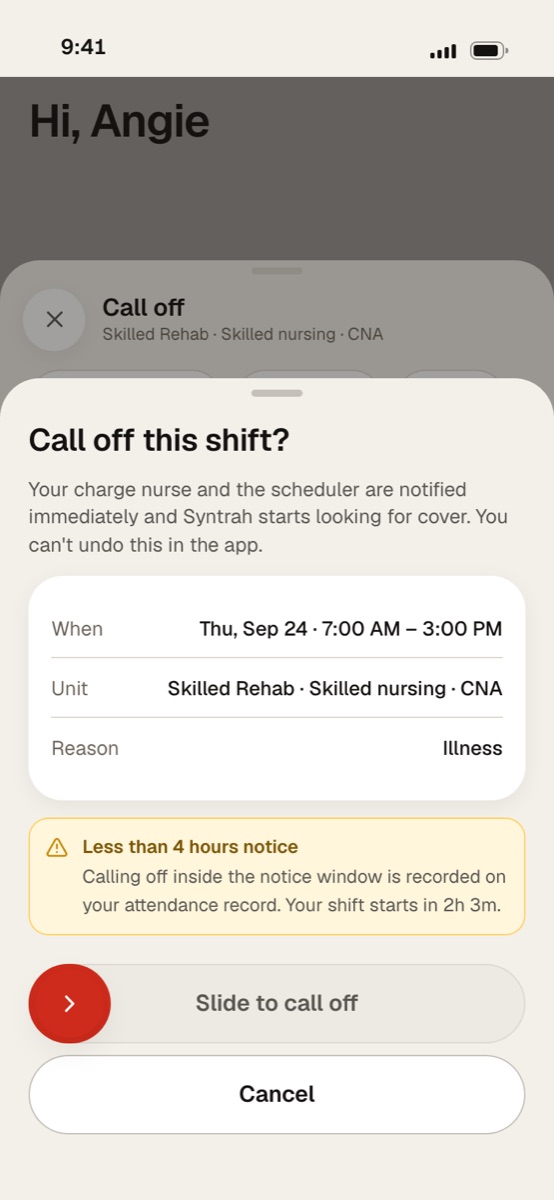
    She picks a reason and finishes the red slide. The app tells her first: her charge nurse and scheduler are notified at once, a call-off inside the notice window goes on her attendance record, and she can’t undo it in the app. She doesn’t have to find her own replacement.

    The Syntrah app’s call-off sheet: the shift, the reason, the notice warning, and the red slide to call off.
  2. 4:57 AM

    In the console · the scheduler

    The board sees it at once.

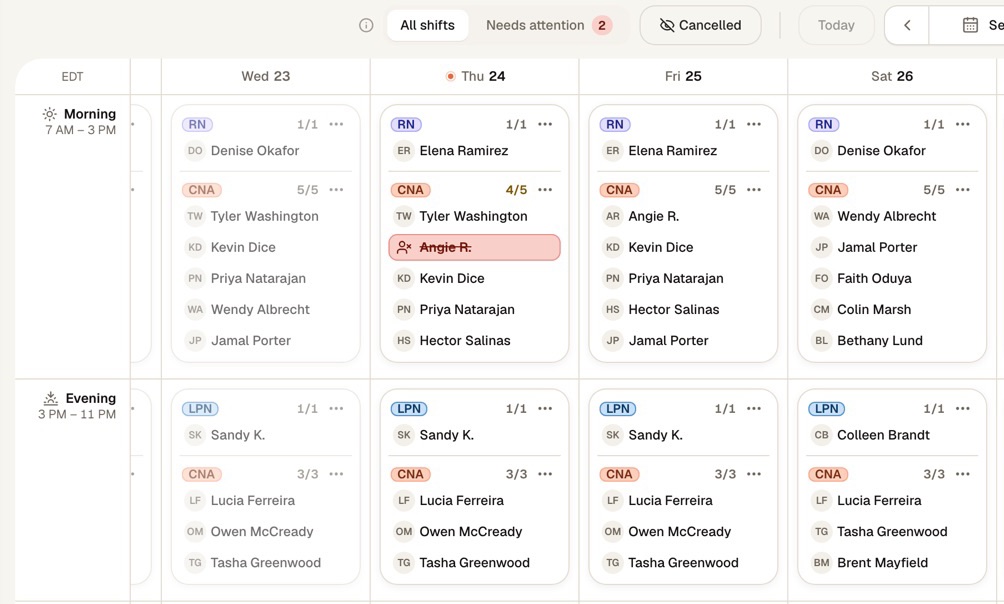
    Angie’s seat is struck through on the unit’s live board, and the morning CNAs drop to four of five. Syntrah is already looking for cover before anyone has picked up a phone.

    The unit’s live board in the Syntrah console, with Angie’s morning seat called off and the CNA line at four of five.
  3. 4:58 AM

    In the console · the eligibility check

    Only people who can work the seat are asked.

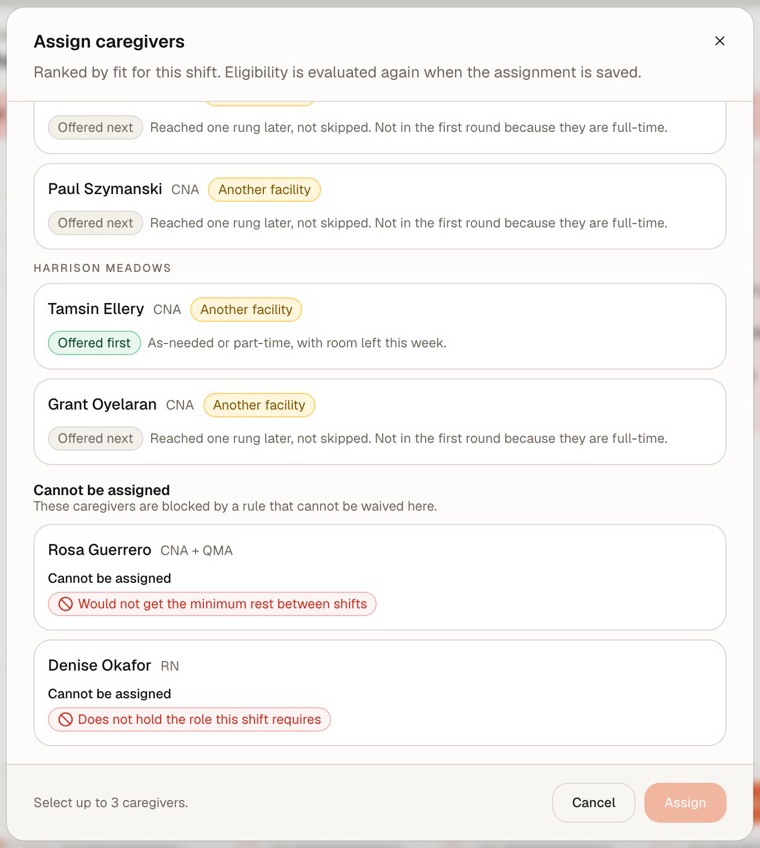
    Candidates are ranked by fit. Part-time and as-needed staff with room left this week are offered first; full-timers are reached one rung later, not skipped. Anyone who can’t work the seat is listed, with the rule that stops them.

    The Assign caregivers dialog: candidates ranked by fit, marked Offered first or Offered next, and two caregivers who cannot be assigned, one short of minimum rest and one without the role.
  4. 5:43 AM

    In the console · the offer ladder

    The offer climbs the ladder by itself.

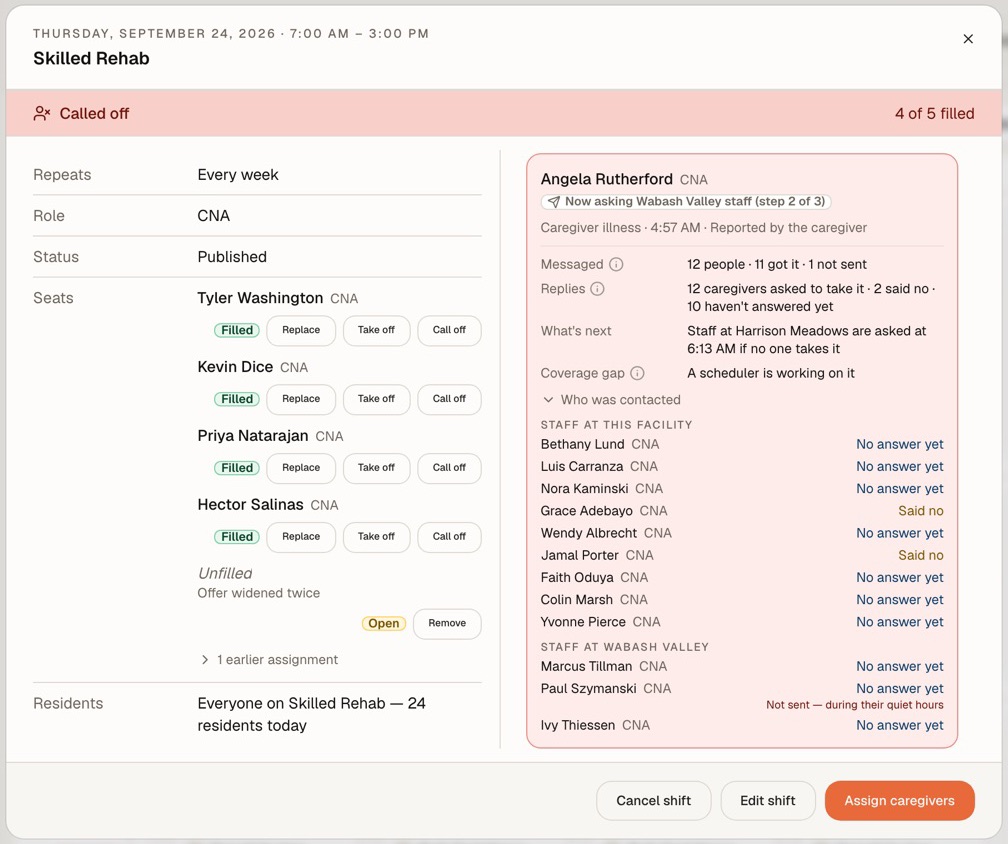
    No yes yet, so everyone eligible here is asked, then your other facilities in the order you set. The call-off card shows who was messaged, who replied, and who is asked next.

    The call-off card, now asking Wabash Valley staff at step two of three: who was messaged, the replies, and what happens next.
  5. 5:51 AM

    In the app · Marcus, CNA at a sister facility

    Marcus says yes from his phone.

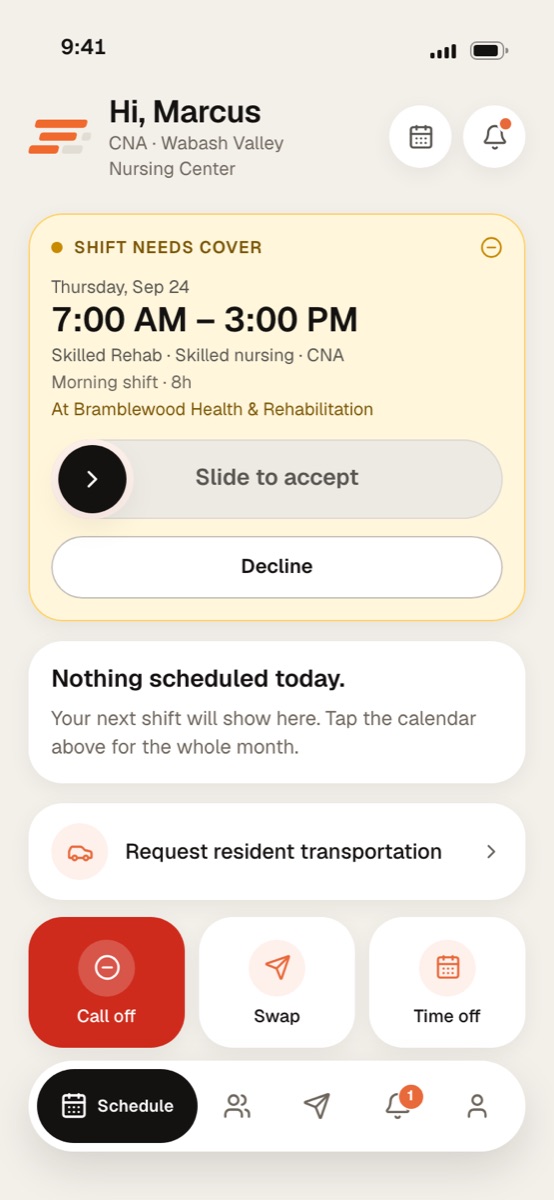
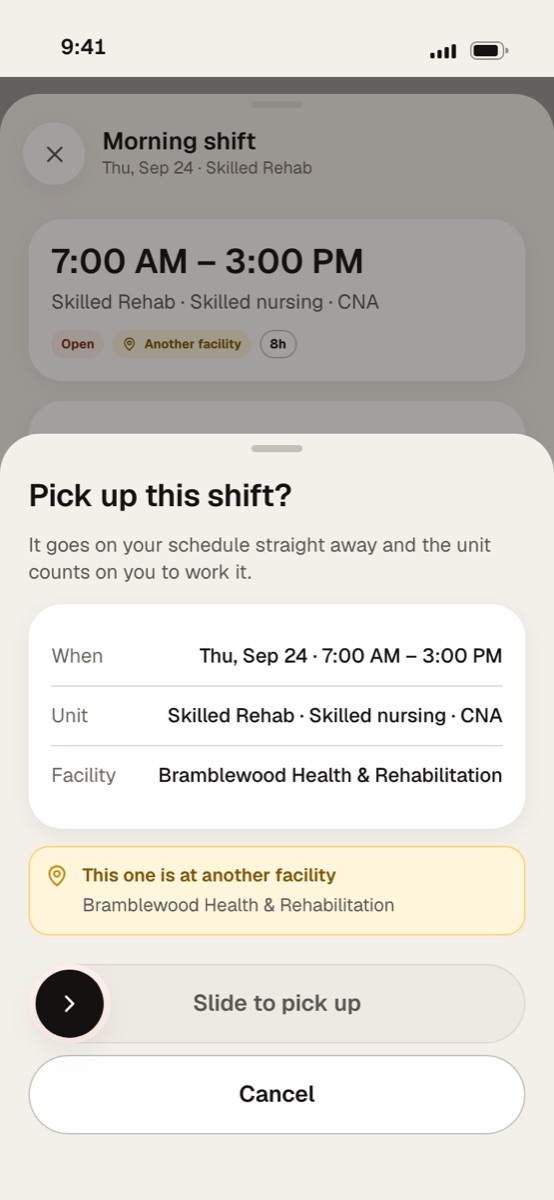
    The offer lands on his home screen with an Another facility badge, and the confirm sheet names the building again before he slides. Once he does, it goes on his schedule straight away.

    The Syntrah app’s pick-up sheet for a morning shift at another facility, with the slide to pick up.
  6. 5:51 AM

    In the console · covered

    Covered, with the whole trail kept.

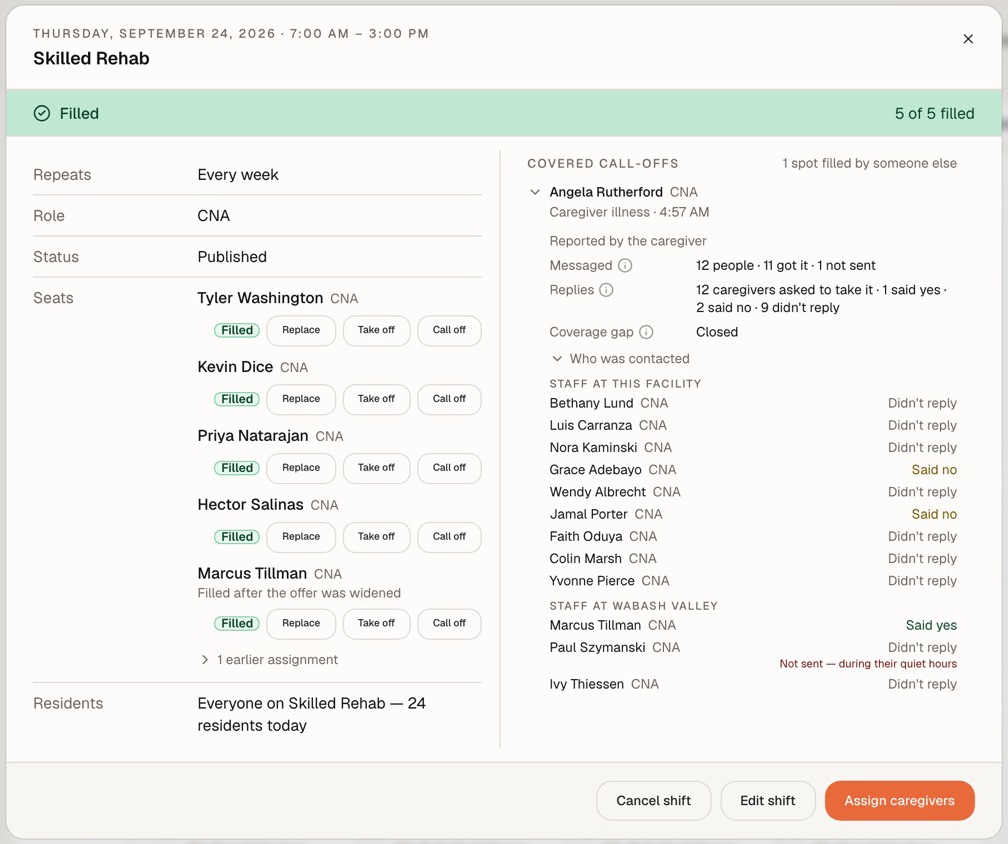
    The first yes takes the shift and the unit is back to five of five. The trail keeps who was asked, in what order, and what each said.

    The shift filled five of five, with the covered call-off’s trail: who was messaged, who replied, and who said yes.
  7. 6:54 AM

    In the app · Marcus arrives

    Marcus clocks in on arrival.

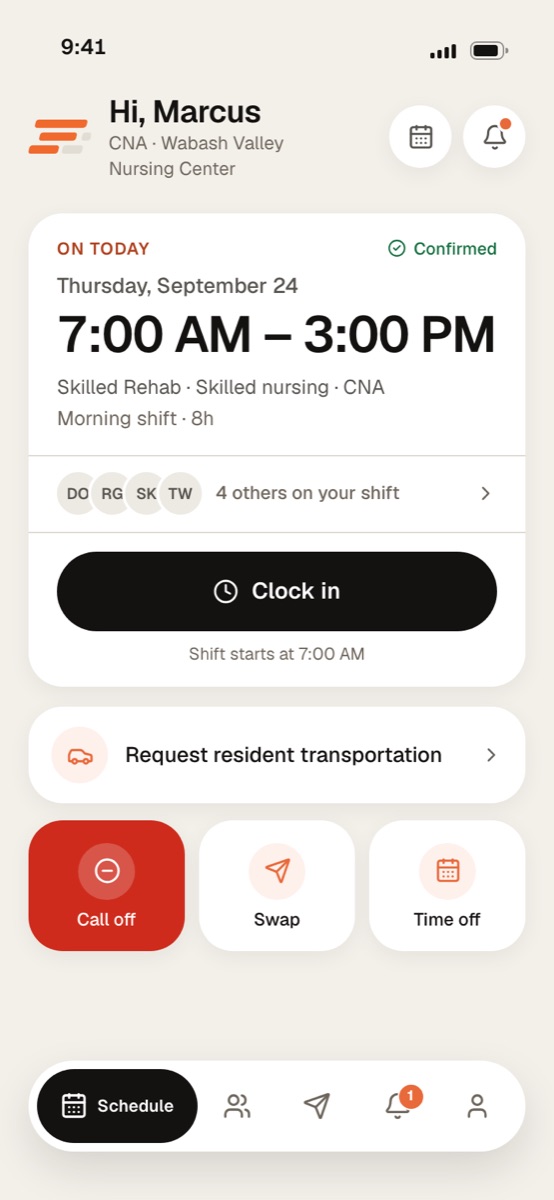
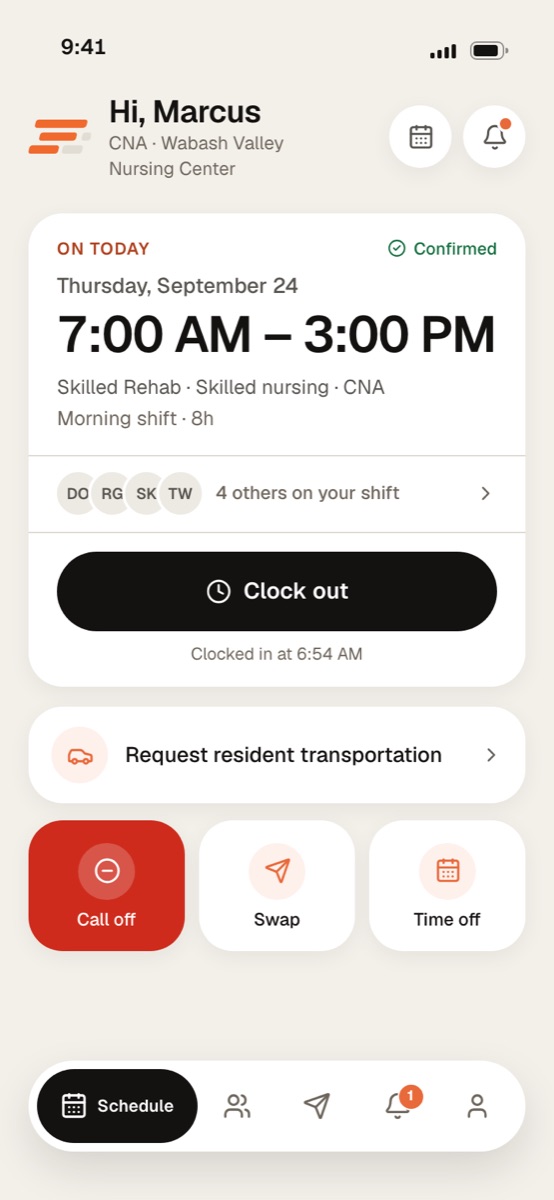
    His Today card shows the shift, who’s on with him, and when clock-in opens. He clocks in from the app, and the board shows him working before day shift report.

    The Syntrah app’s Today card for Marcus, clocked in for the 7 AM shift.

Screens show a sample facility with fictional data.

The offer ladder

Who hears first, and who hears next.

Every call-off climbs the same four rungs, in your order. How long each rung waits is your own coverage policy.

If nobody says yes, the shift is declared uncovered and escalated to a scheduler - never left to expire.

  1. 1

    Part-time and as-needed staff with room left this week

    Offered first.

  2. 2

    Everyone eligible at the facility

    Full-timers are reached here, one rung later, not skipped.

  3. 3

    Your other facilities, in the order you set

    An offer at another building says so before anyone accepts.

  4. 4

    Declared uncovered and escalated to a scheduler

    A person takes it from here.

Eligibility

Every check before anyone is asked. Nobody lands on a seat they can’t work.

The same checks run wherever someone could be placed on a shift - an offer, an assignment, a swap - and again as it is saved.

  • Holds the role the shift requires
  • License is active
  • In good standing on the nurse aide registry
  • Background and health screening are current
  • Signed off for this unit
  • Credential verification is up to date
  • Verification recorded against the primary source
  • Agency staffing profile is in place
  • Not already working an overlapping shift
  • Gets the minimum rest between shifts
  • Inside their stated availability
  • Within the maximum consecutive days worked
  • Not excluded from federal or state healthcare programs
  • No adverse finding on record

Registry and license checks are attestations: someone on your team looks the caregiver up and records the source they checked. Syntrah doesn’t fetch them from the registry.

For the office

Every unit, every shift, on one screen.

Administrators, directors of nursing and schedulers work from the console: live coverage, unit schedules, call-offs, timecards, credentials and shift requests, in one place.

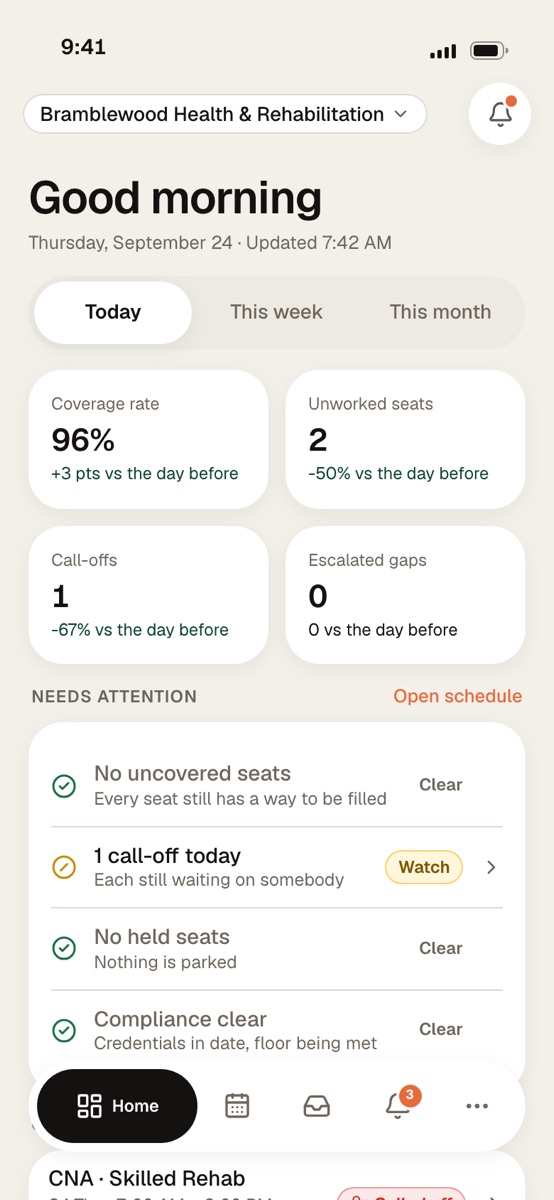
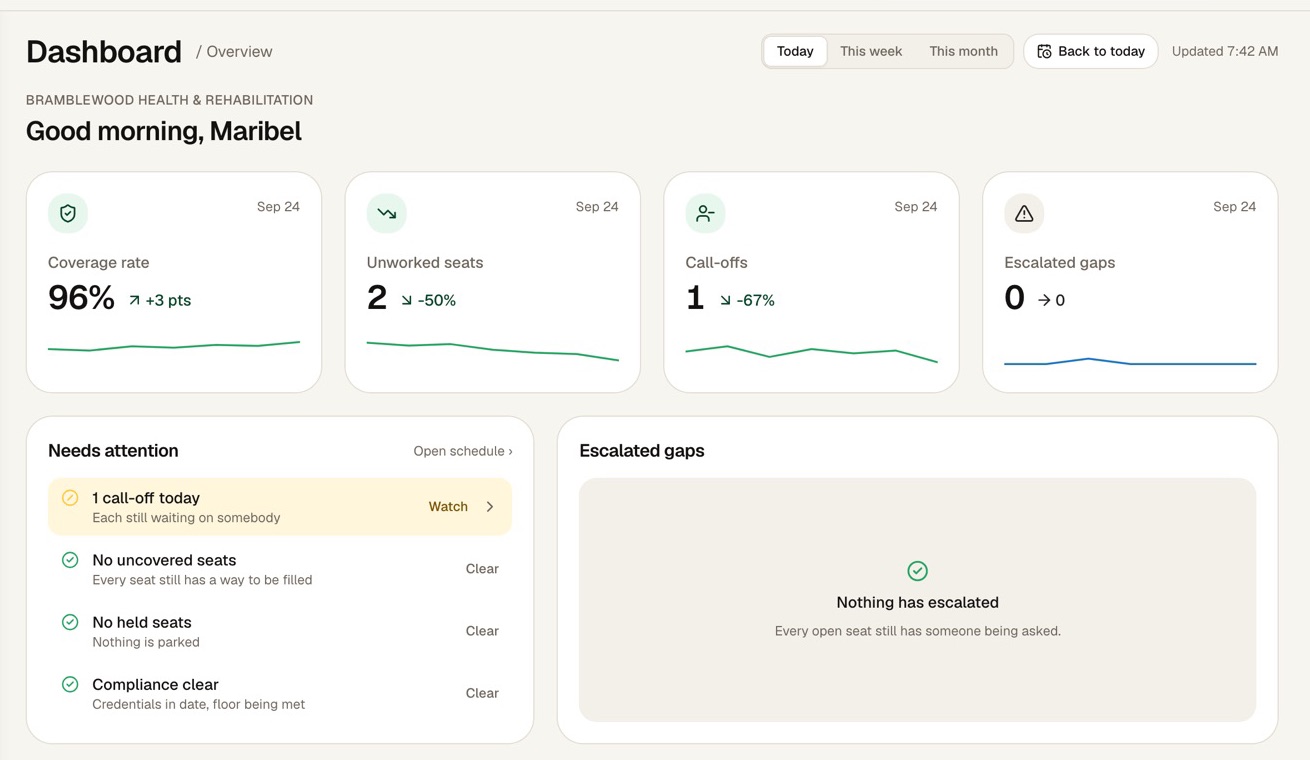
The Syntrah console’s dashboard: coverage rate, unworked seats, call-offs and escalated gaps for today, with what needs attention first.

Command Centre

Start every morning with the answer.

Coverage rate, unworked seats, call-offs and escalated gaps for today, and what needs attention first. Unworked seats are counted in seats, not shifts: a shift that needs three nurses and has one shows two.
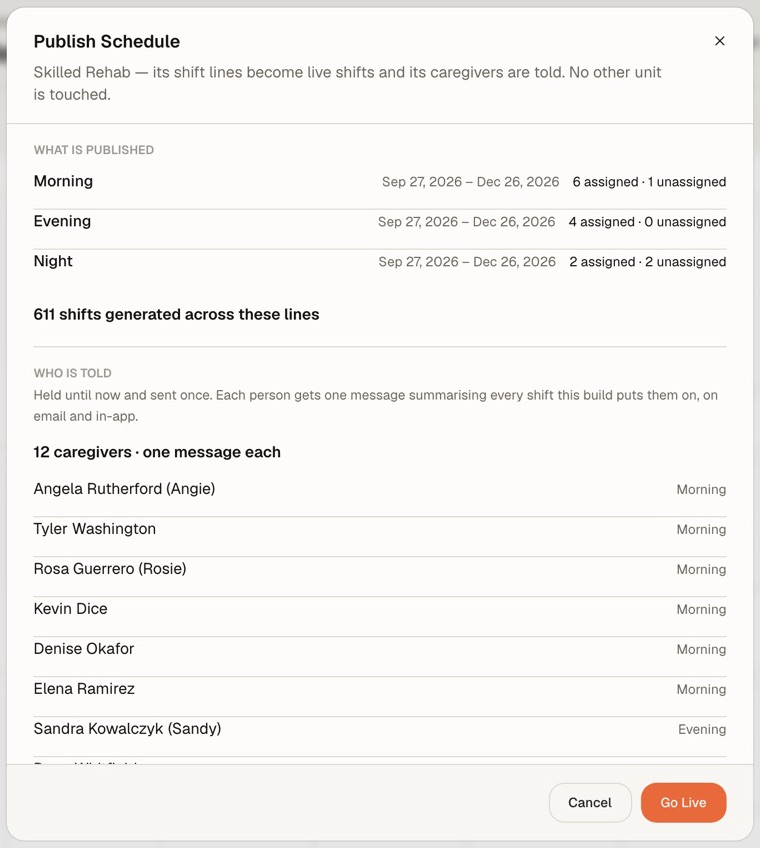
The Publish Schedule dialog: the unit’s lines, the shifts they generate, and one message per caregiver.

Unit schedule builder

Build the rotation once. Publish it once.

Draft a unit’s Morning, Evening and Night lines and commit them up to 26 weeks ahead. Nobody hears a thing until you publish; then each person gets one message covering every shift, by email and in the app.

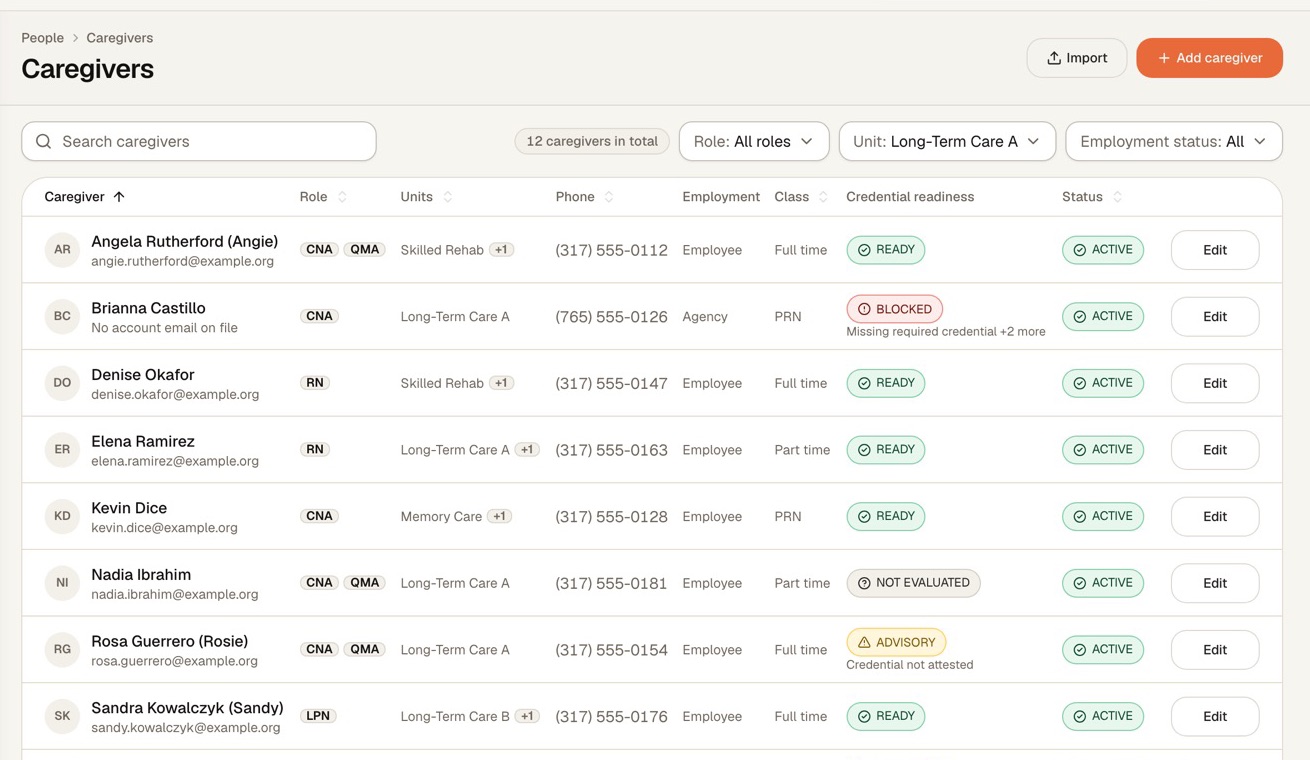
The caregiver roster in the Syntrah console, with each caregiver’s credential readiness: ready, advisory or blocked.

Credentials

Readiness before rostering.

Ready, Advisory or Blocked beside every caregiver: licenses, registry listings, screenings and training on file, and whether anybody has checked them.

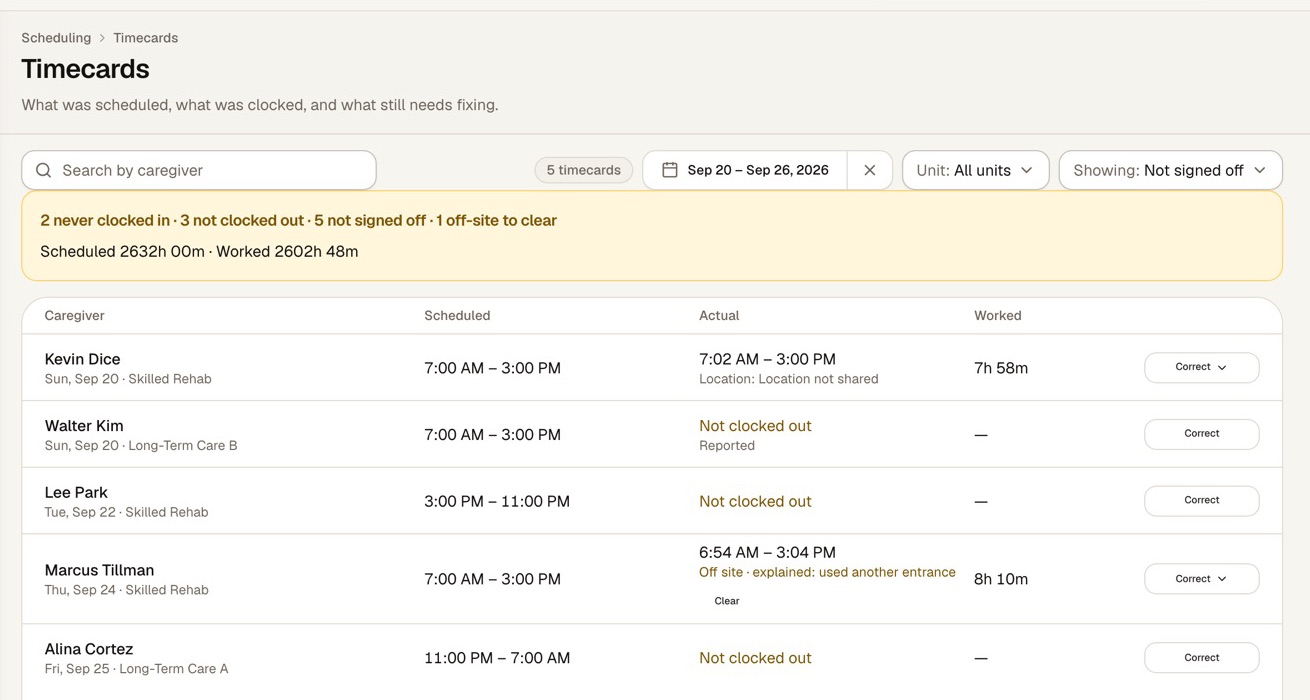
Timecards in the Syntrah console: scheduled and actual times side by side, with an off-site punch waiting to be cleared.

Time and attendance

Punches that know where the building is.

Set how far from the building a punch still counts as on site, anywhere from 25 to 2,000 meters, and what happens to one made outside: off, observe, attest or block. What was scheduled, what was clocked and what still needs fixing sit side by side.

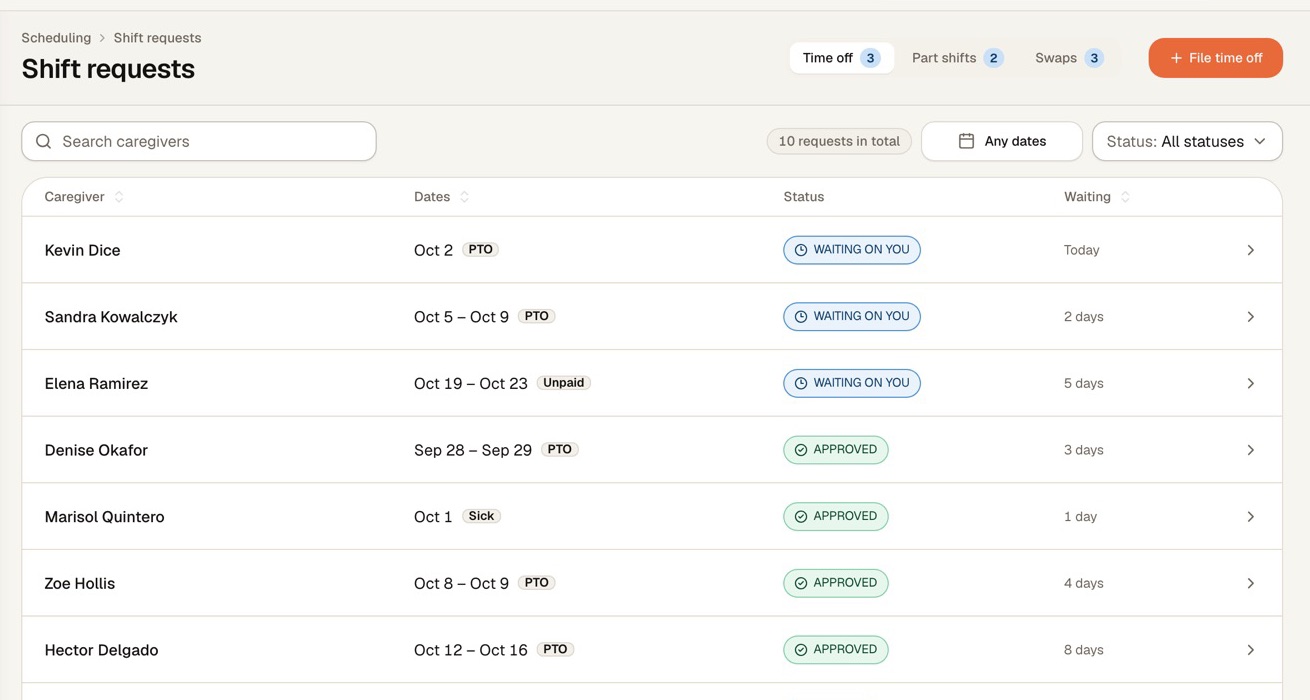
Shift requests in the Syntrah console: time off, part shifts and swaps, each waiting on you, approved or refused.

Shift requests

Time off, part shifts and swaps, in one place.

Caregivers ask from the app, and each request waits in one inbox. Approving time off releases every shift in the range and opens a replacement for each one it releases.

Screens show a sample facility with fictional data.

Resident transportation: rides requested from the floor, arranged from one queue

The mobile app

For caregivers on shift, and the staff who run it.

Calling off, picking up, swapping, asking for time off and requesting a ride all end the same way: a slide finished with a thumb. Manage mode puts the day’s coverage on the phones of charge nurses, schedulers and administrators.

  • An open shift lands on the home screen of everyone who can work it.
  • The day on one card, with clock-in once they are on site.
  • Coverage, what needs attention, and the call-offs still open, in Manage mode.
Explore the mobile app
Trust

Separate by design. Recorded by default.

HIPAA-aligned handling, encrypted in transit and at rest. Each organization’s data kept apart, access that starts at nothing, and a name and a reason on every change that matters.

  • Your data lives apart

    Every organization’s data sits in a database schema of its own, never in rows shared with another operator.

  • Access starts at nothing

    A role sees only what it is granted, scoped to the organization, a facility, a unit, or only their own.

  • Every change has a name on it

    Schedule changes, overrides, coverage gaps and notifications are logged with who, when, and what changed from what.

  • A live schedule asks why

    Change or withdraw a published schedule and a reason is required, recorded against every shift it moves.

Your facility deserves better than 5am panic.

Let’s walk through a call-off together, start to finish.

No pressure. No commitment. Just a conversation about your building.